
When a task finally works, what is the team’s most natural next move?
Save the conversation, extract the final prompt, send it to the group, and tell teammates: “Use this next time.”
But when a second person runs it, the result may still be unstable. The input looks similar, the steps appear to be the same, yet the output changes. Switch to another model, and old pitfalls may appear again.
The issue is often not that prompt itself. The issue is that the team shared one answer, but did not hand over the conditions that made the answer work.
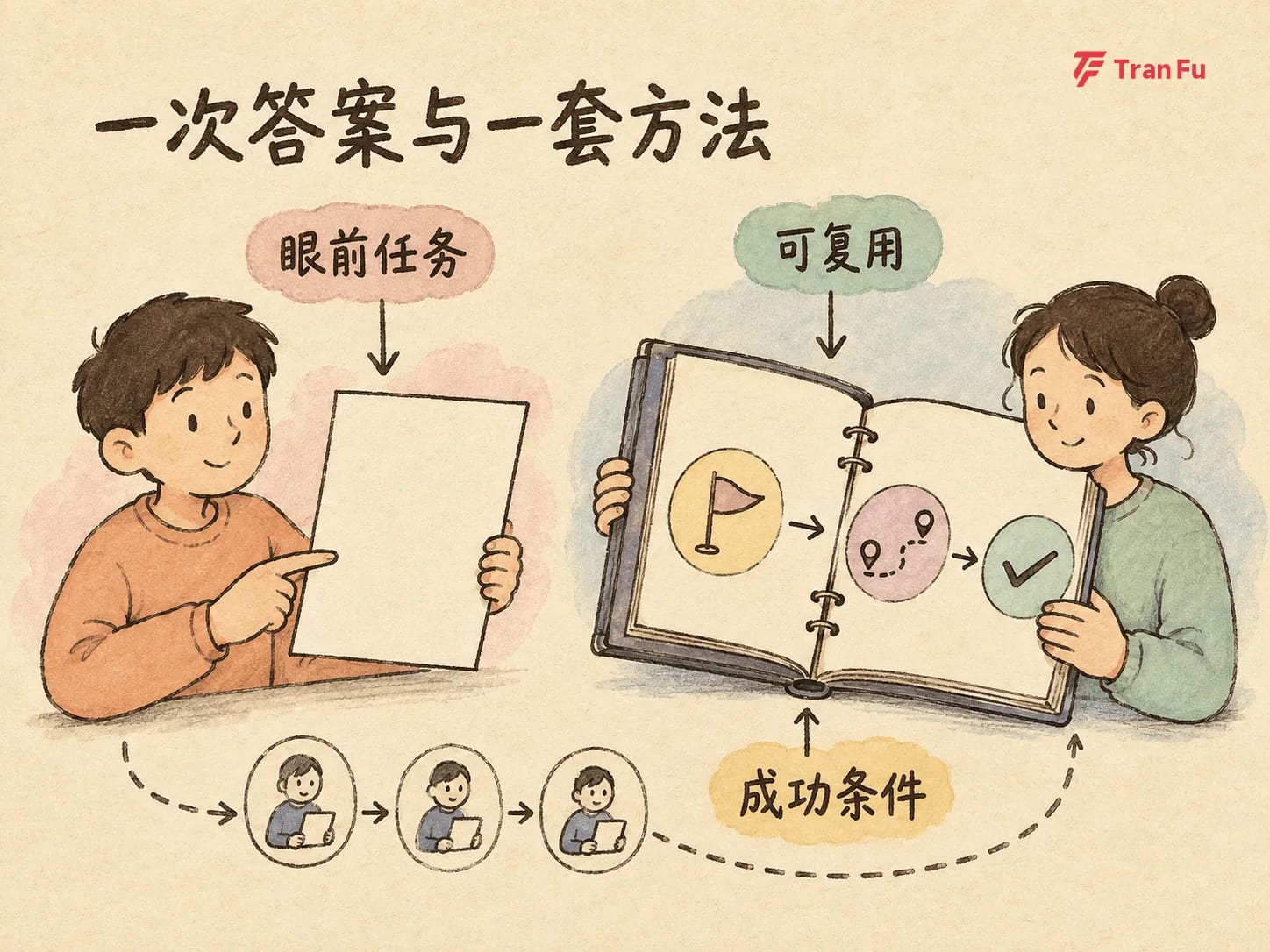
Which materials were used at the time? At which step did a human correct the direction? Which actions were not allowed? Which situations required stopping? What evidence proved the result was ready to deliver? These details are usually scattered across conversations, files, and human judgment.
So one success only proves that this run worked. It starts becoming team capability only when the conditions for success can be reproduced, failures can be recognized, and results can be accepted with evidence.
That is why Agent Skills are worth discussing. The point is not to “write more Skills.” The point is to learn which experience deserves to be captured, and how to prove that it is more reliable than the previous way of working.
A Skill is not just a longer prompt
Conversation history is useful for reviewing a single process. A prompt is useful for describing the request in front of you. A Skill solves a different problem: when an Agent encounters a certain type of task, it can know when to use a method, what it needs before starting, which steps to follow, and how to check the result.
In the open Agent Skills format, a Skill is at minimum a directory that contains SKILL.md. It can also include scripts, references, templates, and other supporting resources as needed.
One detail is easy to miss: the description is not only an introduction. It should also explain “when to use this.” If it does not match how teammates describe real work, the Skill may fail to appear when it should, or it may be triggered for a similar-looking task where it does not apply.
That is the difference between “saving a good prompt” and “capturing a capability”:
-
A prompt records how to ask for the current task;
-
A Skill records when a class of tasks should start, how to execute it, and how to judge completion.
But that does not mean every agreement should be stuffed into a Skill.
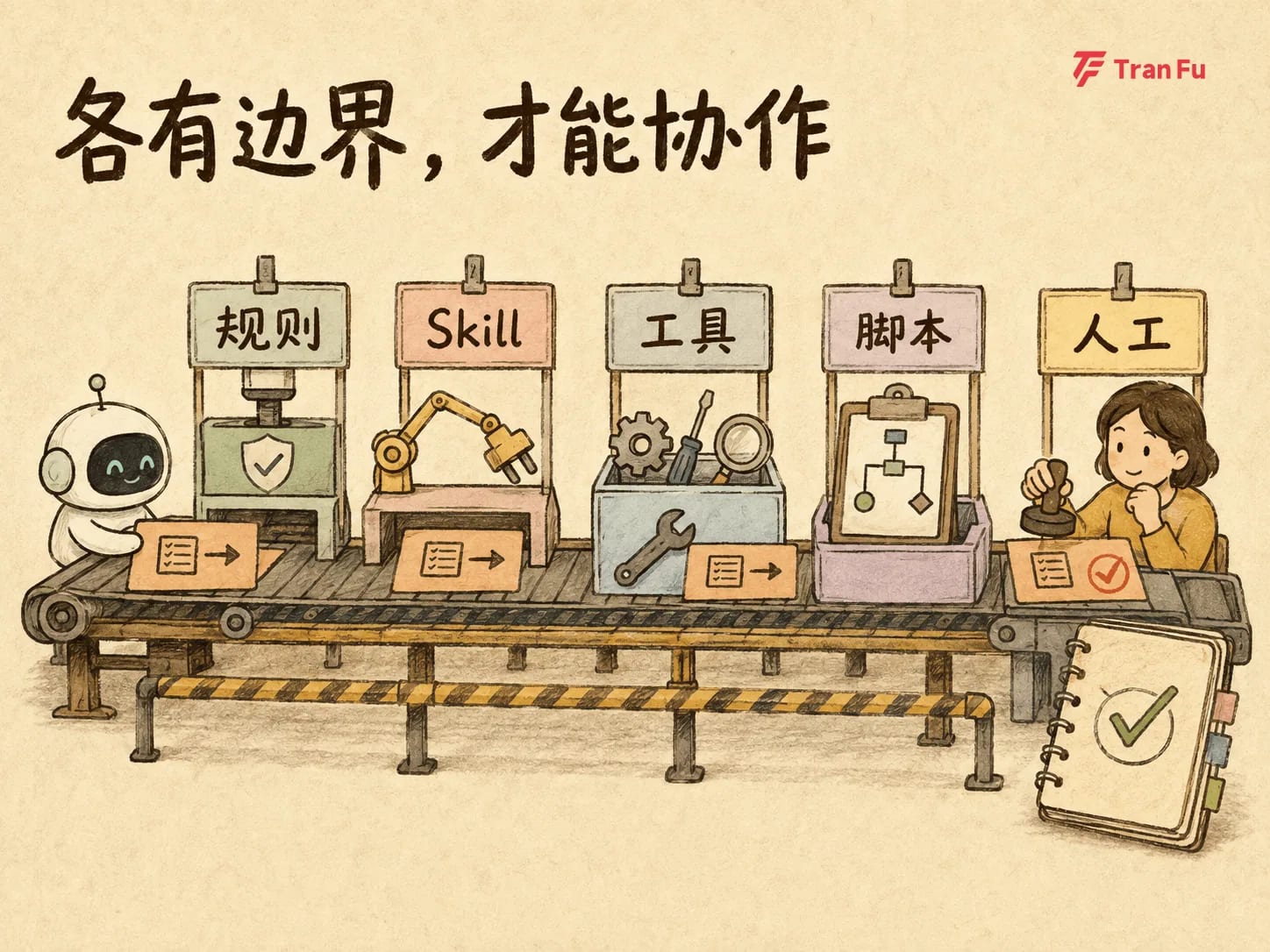
Safety requirements that apply across tasks are better placed in rules. Methods for a certain task type fit Skills. Connections to external systems should be handled by tools or MCP. Mechanical checks such as fields, counts, and file existence are good candidates for scripts. High-risk trade-offs and subjective quality judgments still belong with people.
These mechanisms can be combined. They are not mutually exclusive categories. The value of a Skill is not that it handles everything, but that it connects these parts into a repeatable method.
Also remember that an open format only increases the possibility of portability. It does not mean a Skill will run unchanged in every client. Different products may support different extension fields, script environments, permissions, and execution capabilities. Before reusing a Skill across tools, check the target product’s current documentation and test it with a real task.
Before writing a template, replay one real success
When a team prepares to create a Skill, a common move is to open a blank document and ask a model to generate a set of “best practices.”
That kind of content is often complete and correct, but also too generic. Every step sounds reasonable, yet in a real project it may miss the constraints that actually determined the result.
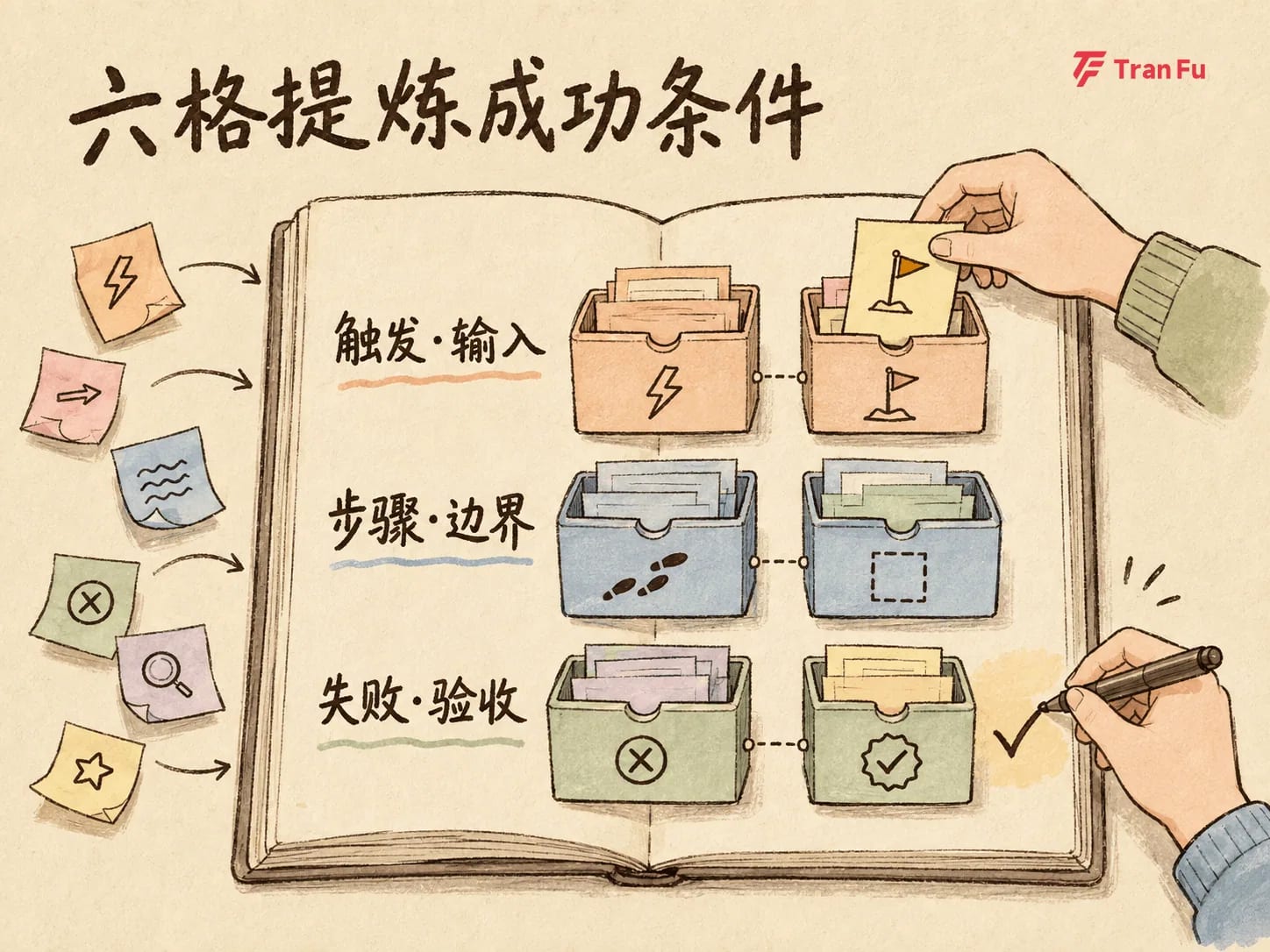
A more reliable starting point is to find a real task that has already been completed and replay it from start to delivery. Do not copy every conversation. Focus on six kinds of information:
-
What inputs were required before starting;
-
Which steps actually moved the task forward;
-
Where humans corrected the Agent;
-
Which project rules could not be inferred from common sense;
-
What failures occurred and how recovery happened;
-
What evidence proved the work was ready to deliver.
For example, in a content review task, success may not come only from writing “check for typos” in the prompt. The effective conditions may include first locking the factual sources, separating factual issues from expression issues, rechecking key claims after editing, and sending disputed items that cannot be judged automatically back to a human.
Extract those conditions, and you get a method for a class of tasks rather than a photocopy of one polished answer.
Tranfu’s existing content has consistently emphasized goals, context, permissions, feedback, verification evidence, human confirmation, and failure recovery. This is Tranfu’s editorial stance, not a universal industry law, but it provides a practical review lens: do not only ask what the Agent did. Ask why the task could be completed, and why the team should trust the result.
Of course, coming from a real task does not mean the first version is mature. Real success only gives a sturdier starting point. Stability still comes from running, observing, and revising.
Use the six-box extraction method to write a minimal task manual
The following “six-box extraction method” is a practical Tranfu framework synthesized from public specifications and practice. It is not an official fixed six-part structure in the Agent Skills specification.
Its purpose is to surface the information that is most easily lost inside one successful run.
Box 1: Trigger conditions
Answer two questions: what tasks should invoke this Skill, and what similar tasks should not?
For example: “Use this when the user provides a complete draft and asks for checks on factual boundaries, structure, and language. Do not use it for topic selection, scattered materials, or title-only work.”
Trigger conditions should be tested against the words teammates actually use, not only abstract categories.
Box 2: Inputs and prerequisites
List the files, data, tools, permissions, versions, and context that must exist before the task starts.
For example: “A complete draft and usable factual sources are required. Private materials require read permission. If key sources are missing, stop factual judgment and report the gap.”
The clearer the prerequisites are, the less likely the Agent is to fill in things that should not be filled in with common sense.
Box 3: Reusable steps
Keep only the actions that truly contributed to the result and will repeat next time.
A content review can be split into: extract key claims, bind each claim to a source, mark insufficient evidence, then check structure and language, and finally recheck key claims after edits.
The steps should be specific enough to guide execution, while removing temporary filenames, passwords, and accidental detours that only applied once.
Box 4: Boundaries and routing
Clarify what belongs in the Skill, and what should be handled by rules, scripts, tools, or humans.
For example, a prohibition on leaking private data should be a persistent rule. Reading a content repository should go through an approved tool. Checking field counts can be scripted. Judging whether a viewpoint may mislead readers should remain under human review.
Box 5: Failure handling
Explain which failures can be retried, which situations must stop, and how recovery should happen.
For example, if a source file cannot be read, stop factual checking and report what is missing. If a structure check fails, revise and rerun it. If authoritative materials conflict with each other, do not decide arbitrarily for the user; preserve the conflict and each source’s scope.
A process that only describes the happy path cannot handle real work.
Box 6: Acceptance evidence
Finally, state what evidence proves the task is complete, rather than accepting the Agent’s statement that it is “done.”
Computable conditions such as required fields, file counts, paths, and formats can be written as deterministic assertions and delegated to validation scripts. Whether the style feels natural, the conclusion fits the topic, and the risk is acceptable still requires human judgment.
Scripts handle the computable question of “is this correct?” People handle the judgment-heavy questions of “is this good?” and “should we do this?”
After the six boxes are filled, the team does not have a longer prompt. It has a minimal task manual: when to start, what execution depends on, when to stop, and how to prove the result holds.
Do not promote it immediately; first run a with-and-without-Skill comparison
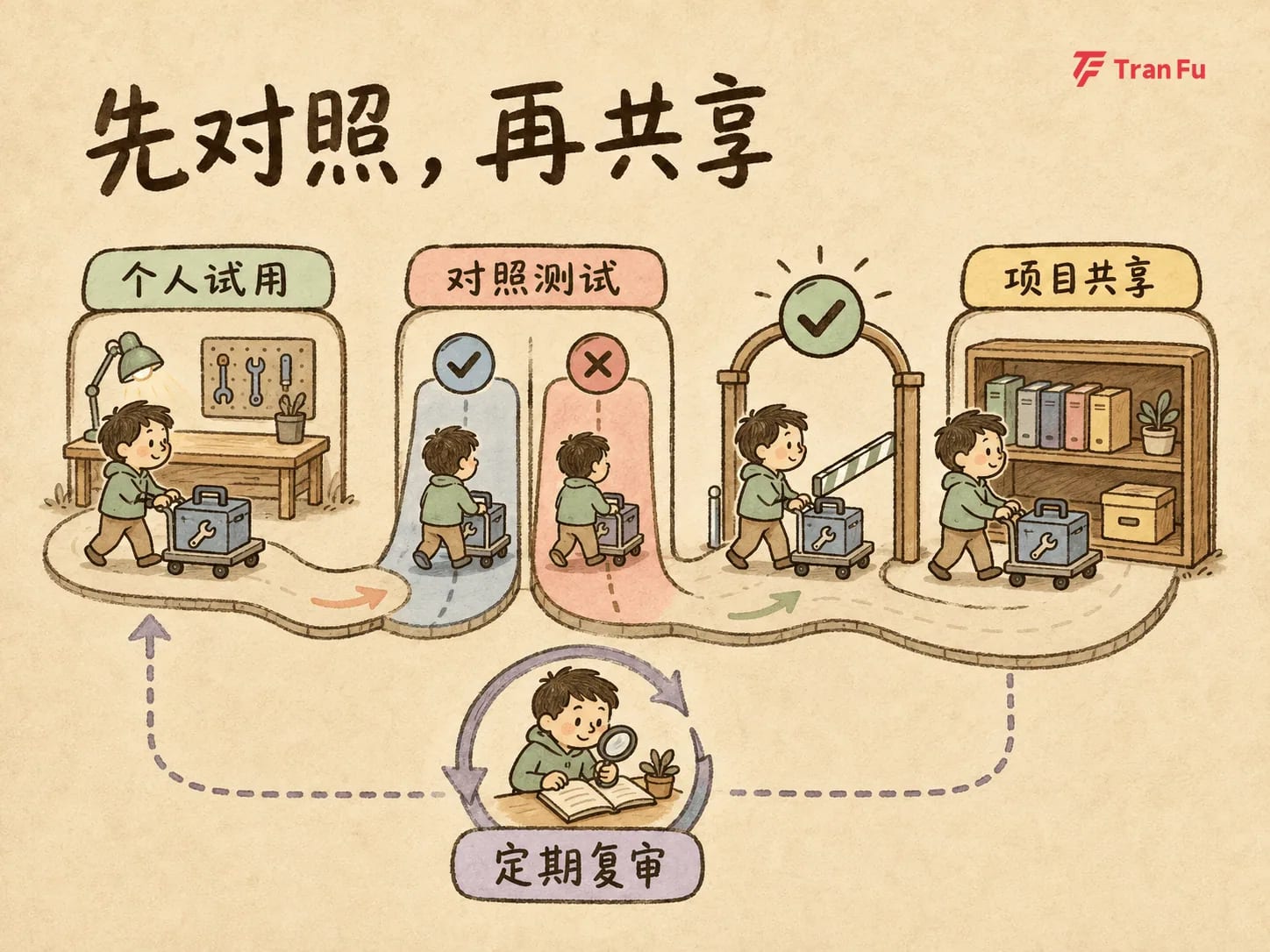
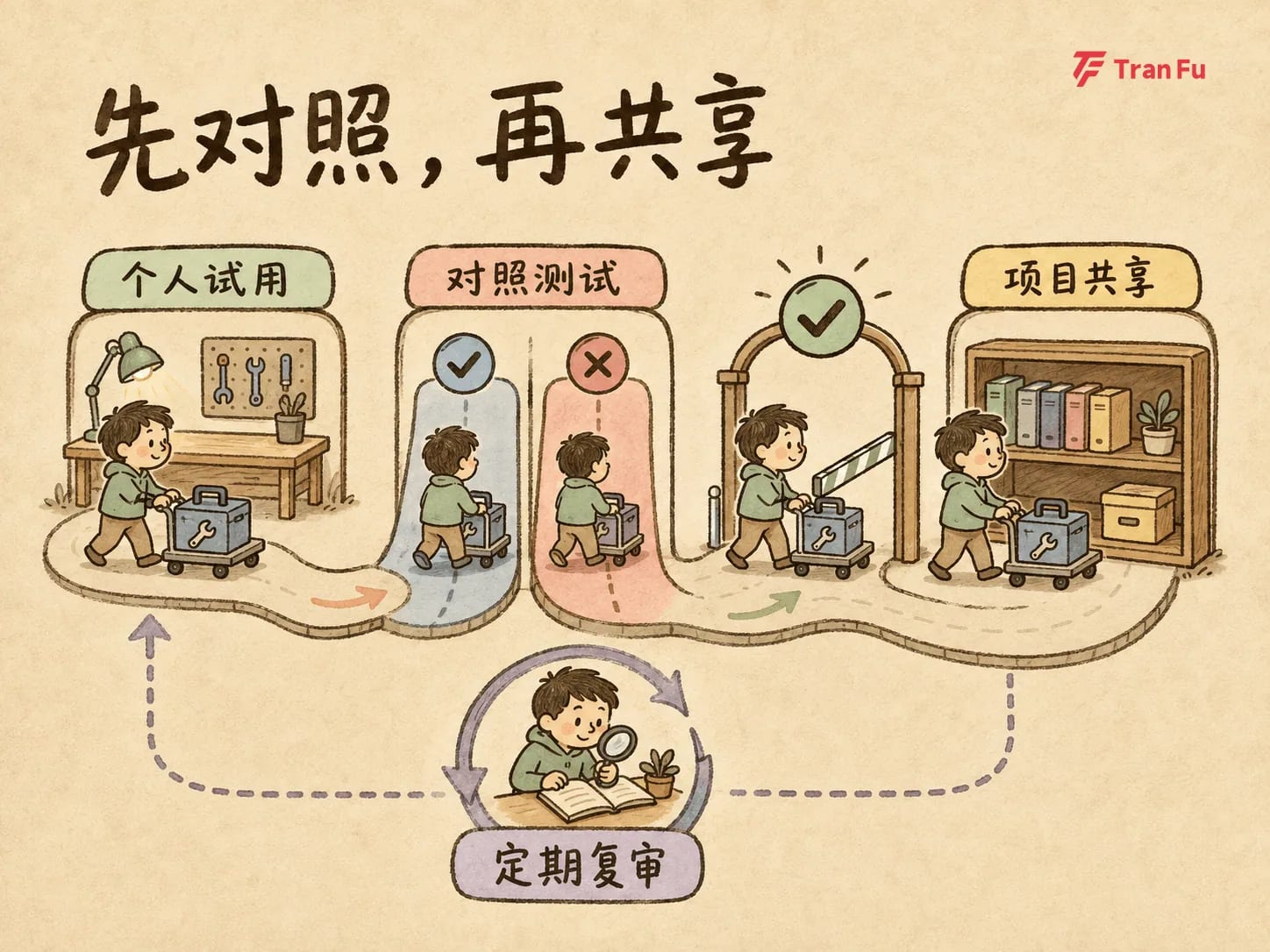
Sharing magnifies good methods, but it also magnifies mistakes. So after a Skill is written, the next step is not to ask everyone to install it. First let it pass through a controlled promotion path.
Start with low-risk personal use. Select several real tasks that have already happened, including both normal inputs and boundary cases. Run the same batch with and without the Skill, or compare a new version against an older one.
Observe more than whether it “looks better.” Track:
-
How many objective assertions passed;
-
Where human corrections happened;
-
Whether total time changed;
-
Whether context cost increased;
-
Whether boundary inputs revealed new risks.
Only when the comparison shows stable improvement on the target task, without adding unacceptable cost, should it move into project-level sharing.
Early test samples are usually small. They are useful for comparing versions inside a team, but not suitable for packaging as statistically meaningful industry conclusions. Raw pass/fail records and failure notes are more valuable than a vague statement that “it worked well.”
Later, organization-level maintenance needs a clear owner, supported clients and versions, required permissions, review cadence, and the changes that trigger retesting.
On September 2, 2026, Microsoft released a Copilot Studio update that supports adding a Skill to multiple Agents and sharing it with team members, so verified methods can be reused. This is a clear product signal for team capability distribution, but it only represents Copilot Studio’s support scope at that time. It should not be generalized to every Agent platform.
If a Skill can execute scripts or access external systems, governance requirements become higher. The team needs to confirm trusted sources, maintain least privilege, validate inputs, constrain and isolate execution, retain necessary audit trails, and require explicit approval for high-risk operations. At that point, the Skill is not just documentation. It should be managed as code and a permission-bearing asset.
Not every successful experience deserves to be solidified
More captured processes are not always better. At least four kinds of tasks should not be turned into Skills too quickly.
First, tasks that can already be completed stably without a Skill. Adding more process may only increase trigger and context cost.
Second, tasks that differ greatly every time and do not have a coherent reusable method. One-off strategic judgment or exception handling with incomplete information may be better preserved as retrospectives and human decision notes.
Third, tasks that happen rarely, where maintenance cost is higher than benefit. There is no universal frequency or return-on-effort threshold here; each team should decide based on its own usage, risk, and maintenance capacity.
Fourth, tasks that cannot define reliable acceptance, or where risk must depend on human judgment. This is especially important for sensitive data, external writes, and irreversible operations. If permissions, stop conditions, and approval mechanisms are unclear, the execution scope should not be expanded through a Skill.
Even when the task itself is suitable, the Skill’s scope may be wrong. Too broad, and the method becomes vague while false triggers increase. Too narrow, and the team creates many small files that are hard to discover and maintain.
Skills also expire like ordinary documents. Team workflows change and dependencies upgrade, making old descriptions and steps invalid. A Skill must be updateable, and it must also be possible to disable it.
“Not making a Skill” does not mean “not recording anything.” Rules, retrospectives, checklists, scripts, tool connections, and human decision notes may all be better homes.
This week, run one minimal experiment
There is no need to build an entire organization-level Skill library first.
Start with one real task that is frequent, repeatable, and has verifiable results. Complete one six-box card. Then prepare three sets of real tests, including at least one boundary case. Run versions with and without the Skill, and preserve outputs, failure evidence, objective assertion results, and human judgments.
Finally, assign an owner, record supported clients and versions, and agree on which changes require review.
Only expand sharing if the result truly improves. If it does not improve, keep revising, or admit that this task does not need a Skill.
Organizational capability has never been about the number of files. What matters is whether the team can make the right method reliably invoked, verified, and updated, while also stopping when it does not apply.